
#vaikhari
Write once, post to X and LinkedIn from the terminal. One editor with a live preview of how each network will show your post, drafts, a schedule, and an AI agent that can draft posts for you (you approve every one). Free: LinkedIn through its free API, X through its own share page with one click.
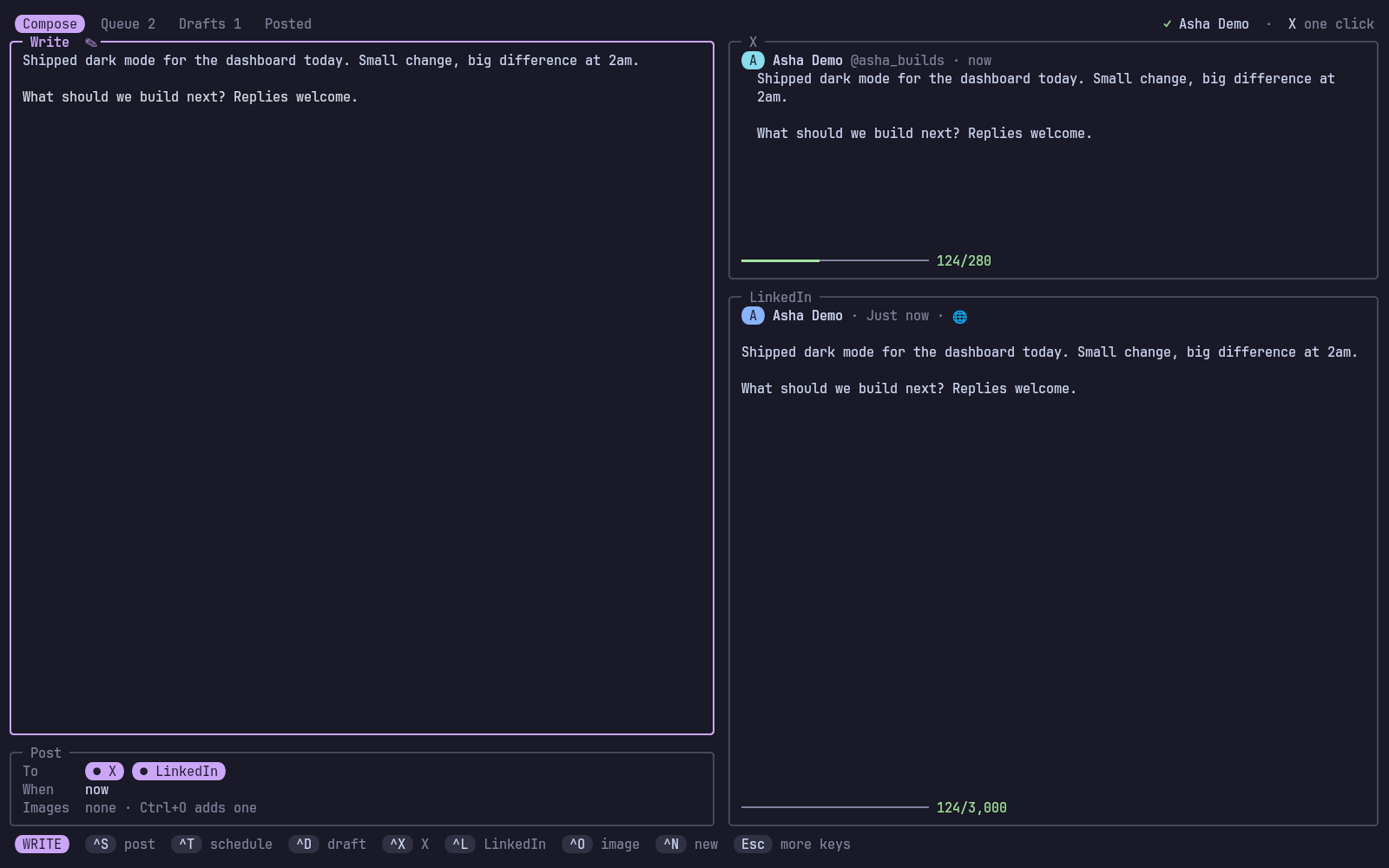
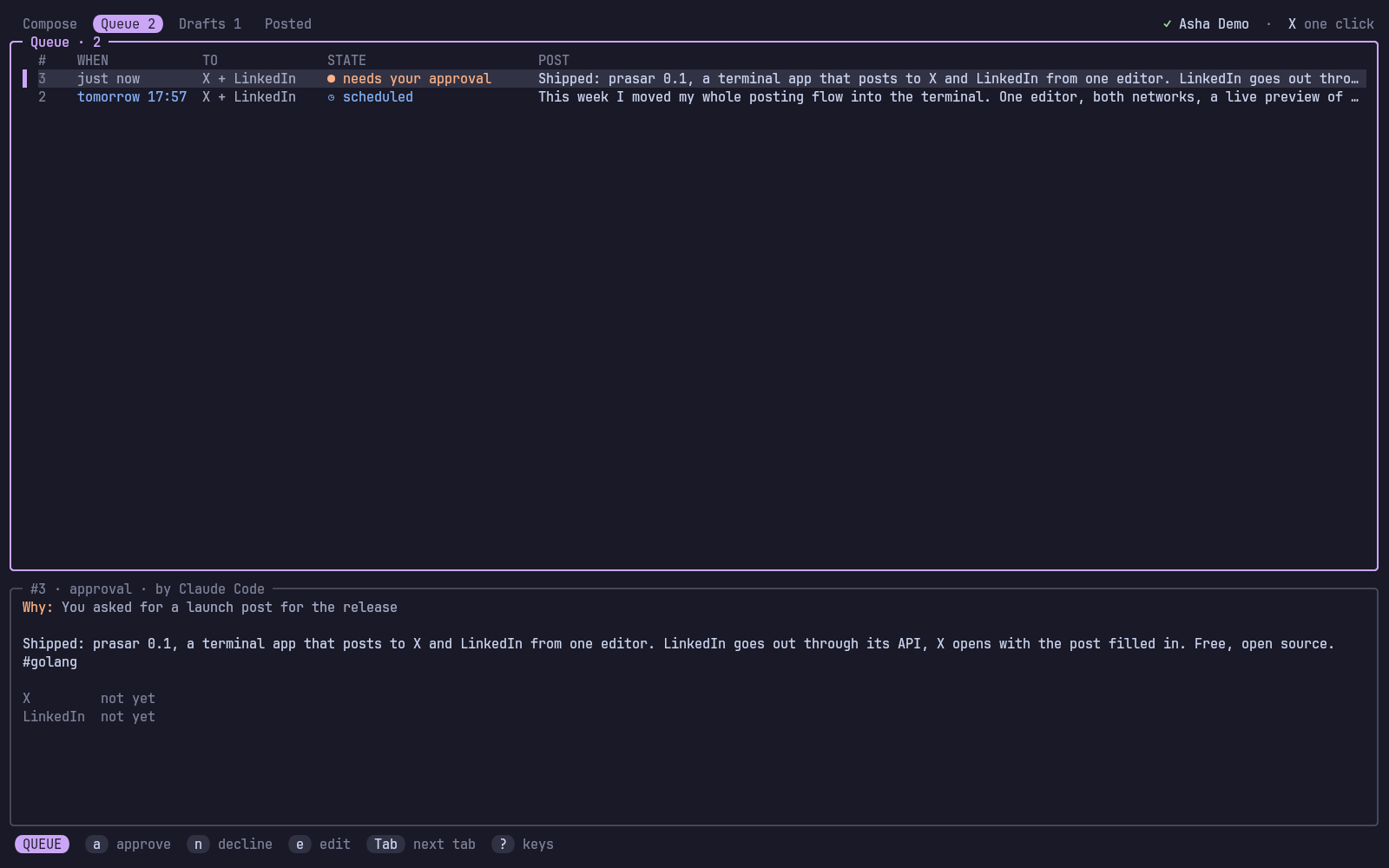
Screenshots use vaikhari demo: a made-up account.
Vaikhari (वैखरी) is Sanskrit for "spreading out, broadcast".
#What it does
- One editor, two previews. Write on the left; on the right, the post as X shows it (with X's own count: links are 23, CJK and emoji 2) and as LinkedIn's feed shows it (folded where "…see more" cuts it), each with a meter that turns yellow near the limit.
- Threads. A post longer than X's 280 becomes a thread, split at sentence ends and numbered
1/3, or split it yourself with a line holding only---. On LinkedIn those lines become paragraph breaks, so the same text is one post there. - LinkedIn posts by itself through its free API, images included, and
#wordsbecome real hashtags. - X with one click: vaikhari opens X's share page with the post filled in, you press Post. Images go to your clipboard to paste. Why: X's API costs money per post since 2026 (ADR 2).
- Drafts, a schedule, history: tabs for Compose, Queue (waiting and scheduled), Drafts and Posted, with each post's links.
- Never lose a post: closing the screen keeps what you wrote as a draft.
- Agents draft, you decide:
vaikhari mcplets Claude Code (or any MCP agent) check, draft and propose posts; every one waits for your approval in a popup, where you can edit it (ADR 3). - Looks like the rest of your terminal: rounded boxes and key caps like narada, pattan and nauka, in your varna theme's colours (Catppuccin Mocha without it), changing live.
#Install
With kosha:
kosha install vaikhariOr with the installer, which downloads the release binary into ~/.local/share/vaikhari (or builds it with Go) and links ~/.local/bin/vaikhari:
curl -fsSL https://raw.githubusercontent.com/Theyashsawarkar/vaikhari/main/install.sh | bashFrom source: make && make install (Go 1.26+).
As a tmux plugin (TPM), prefix B opens it in a popup:
set -g @plugin 'Theyashsawarkar/vaikhari'The plugin runs the vaikhari on your PATH, or builds its own copy with Go the first time.
Optional: wl-clipboard (Wayland) or xclip (X11) for images on X and copying links, notify-send (libnotify) for notifications, secret-tool (libsecret) to keep the LinkedIn sign-in in your keyring.
Try it first without any account: vaikhari demo runs it with a fake LinkedIn in a throwaway folder (nothing is posted, X isn't opened).
#Set up LinkedIn
vaikhari posts to LinkedIn through an app of your own: free, self-serve, about two minutes, once (ADR 4).
vaikhari auth linkedin --setupIt walks you through it:
- At linkedin.com/developers/apps/new create an app: any name, a LinkedIn page as its company (LinkedIn needs one; one you create works) and a logo.
- On the Products tab add Share on LinkedIn and Sign In with LinkedIn using OpenID Connect (both approved at once).
- On the Auth tab add
http://localhost:8723/callbackto "Authorized redirect URLs", and copy the Client ID and Primary Client Secret into vaikhari.
Then your browser opens on LinkedIn's sign-in. LinkedIn's sign-in lasts 60 days and can't be renewed silently: the screen's top right shows the days left, turning yellow in the last week, and L (or vaikhari auth linkedin) signs in again.
vaikhari posts to your personal profile. Company pages need LinkedIn's review and aren't supported.
#Posting to X: one click
X has no free API any more, so vaikhari never logs in to X. When a post goes out:
- X's share page opens in your browser with the post filled in (the first image, if any, is on your clipboard:
Ctrl+Vpastes it). - You press Post there.
- Back in vaikhari, press
Enter. Paste the post's link first if you want it kept; for a thread, the link makes the next part a reply to it.
Esc leaves it for later (it waits in Queue, o opens it again); Ctrl+K skips X for that post. A scheduled X post can't go out without you: at its time a notification offers to open it.
#The screen
vaikhari (or prefix B in tmux) opens on Compose, in the editor:
- Compose: the editor, the "Post" box (where it goes:
Ctrl+X/Ctrl+L; when; images), and the X and LinkedIn previews. Under 100 columns the previews give way to their counts. - Queue: what's waiting on you (an agent's post to approve, an X post to click, a LinkedIn post that failed) and the schedule, soonest first, with the selected post in full below. The footer shows the keys for that post.
- Drafts: posts you kept;
eedits one,pposts it,tschedules it. - Posted: what went out, with its links;
vopens one,ycopies it.
The top right says who LinkedIn posts as (and days left) and that X is one click. Tabs count what's in Queue and Drafts.
#Keys
? in the screen shows them all.
While writing
| Key | Action |
|---|---|
Ctrl+S | Post it now (LinkedIn goes out, X opens in your browser; asks first) |
Ctrl+T | Schedule it (tomorrow 9am, fri 6pm, in 2h...) |
Ctrl+D | Save it as a draft |
Ctrl+X | Toggle posting to X |
Ctrl+L | Toggle posting to LinkedIn |
Ctrl+O | Add an image (a path; Ctrl+O on an empty line removes them) |
Ctrl+N | Start a new post (the current one stays as it was saved) |
Esc | Leave the editor (the other keys work then) |
Compose, outside the editor
| Key | Action |
|---|---|
i / Enter | Edit the post |
Everywhere (outside the editor)
| Key | Action |
|---|---|
Tab / Shift+Tab | Switch to the next / previous tab |
1 – 4 | Switch to Compose, Queue, Drafts or Posted |
L | Open LinkedIn's sign-in again (it lasts 60 days) |
? | Show every key |
q | Quit |
Queue, Drafts and Posted
| Key | Action |
|---|---|
j / k | Move to the next / previous post |
Enter / e | Edit the post in Compose |
p | Post it now (asks first) |
t | Schedule it, or move it to another time |
o | Open it on X's page to press Post (and confirm it after) |
a | Approve an agent's post |
n | Decline an agent's post |
r | Send a post LinkedIn refused again |
c | Cancel a scheduled or waiting post |
d | Delete the draft (asks first) |
y | Copy the post's link |
v | Open the post's link in the browser |
While X waits for your click
| Key | Action |
|---|---|
Enter | Confirm it's posted on X (paste its link first for a thread's next part) |
Ctrl+O | Open X's page again |
Ctrl+K | Cancel X for this post (LinkedIn is unaffected) |
Esc | Leave it for later (it waits in Queue) |
#From the shell
vaikhari post "Shipped it #golang"                 # both networks (or config's `networks`)
vaikhari post --linkedin "Only on LinkedIn"
vaikhari post --x --image shot.png "With a picture"
vaikhari post --at "fri 6pm" "Later"               # scheduled
vaikhari post --draft "Not yet"
echo "From a file" | vaikhari post -               # text on stdin
vaikhari check "Will this fit?"                    # X count and thread, LinkedIn count and fold
vaikhari list [draft|scheduled|approval|ready|posted|failed]
vaikhari approve [ID] # an agent's post (the oldest waiting)| Command | What it does |
|---|---|
vaikhari | The screen (--popup KEY: in a tmux popup, KEY closes it) |
vaikhari post TEXT | Post (--x, --linkedin, --at WHEN, --image PATH repeated, --draft); for X it opens the page and asks you to confirm |
vaikhari check TEXT | How the text fits each network |
vaikhari list [STATUS] | Your posts, one per line |
vaikhari approve [ID] | Answer an agent's post |
vaikhari auth linkedin [--setup] | Sign in to LinkedIn (--setup: enter the app's id and secret) |
vaikhari auth status / logout | What's signed in / sign out of LinkedIn |
vaikhari service install|remove|status | The background service that publishes scheduled posts |
vaikhari daemon | The same, in the foreground |
vaikhari mcp [--requester NAME] | The MCP server for agents (stdio) |
vaikhari doctor | Check the setup: LinkedIn, clipboard, notifications, the service |
vaikhari demo | Try it with a fake LinkedIn |
vaikhari keybindings | The keys, for Vayu's keybinding search |
vaikhari --version | The version |
Times (--at, Ctrl+T, t) read the way people write them: in 2h, tomorrow 9am, fri 6pm, next tue 10:00, tonight, 3 nov 10:30, 2026-11-03 18:00. A day without a time means 9:00.
#The schedule
Scheduled posts go out while vaikhari runs (the screen, vaikhari mcp), or at any time with the background service:
vaikhari service install      # ~/.config/systemd/user/vaikhari.service, started now and at login
journalctl --user -u vaikhari -f
At a post's time, LinkedIn goes out by itself and you get a notification; X waits for you (the notification's "Open in browser" opens it). A post is claimed before it's sent, so the screen, the MCP server and the service never publish one twice.
#For AI agents (MCP)
claude mcp add --scope user vaikhari -- vaikhari mcp --requester "Claude Code"| Tool | What it does |
|---|---|
post_check | Lengths, X's thread split, LinkedIn's fold: to fit a post before proposing it |
post_draft | Save a draft you finish in vaikhari |
post_publish | Propose a post, now or send_at later: you approve it first (a tmux popup on the agent's pane, and a notification), and may edit or decline it; the call waits up to 10 minutes and reports what happened |
post_list | Your posts and their links |
post_accounts | LinkedIn's sign-in and days left; X's one click |
Agents never post on their own, and are told X needs your click. What they did is logged in ~/.local/state/vaikhari/agent.log.
#Configuration
~/.config/vaikhari/config.toml (written by vaikhari auth linkedin --setup, private to you):
networks = ["x", "linkedin"]   # ticked in a new post

[linkedin]
client_id = "..."
client_secret = "..."
port = 8723                    # the redirect: http://localhost:<port>/callback
version = "202607"             # LinkedIn API version (YYYYMM); LinkedIn retires each after about a year

[x]
name = "Your Name"             # shown in the X preview (default: your LinkedIn name)
handle = "you" # shown as @you in the X preview| Environment | What it does |
|---|---|
VAIKHARI_HOME | Keep config, posts and state under one folder |
VAIKHARI_OPENER | The program that opens links (default xdg-open) |
VAIKHARI_NO_KEYRING | Keep the LinkedIn sign-in in a file, not the keyring |
VAIKHARI_LINKEDIN_URL | Talk to another LinkedIn (the tests' fake) |
NO_NERD_FONT | Square key caps instead of Nerd Font round ones |
tmux plugin options (set before TPM's run line):
| Option | Default | What it does |
|---|---|---|
@vaikhari-key | B | Key after the prefix (none: no key) |
@vaikhari-width / @vaikhari-height | 90% / 88% | Popup size |
@vaikhari-title | vaikhari | Popup title |
@vaikhari-launcher | Your own popup command instead of display-popup |
#Files
| Path | What |
|---|---|
~/.config/vaikhari/config.toml | Settings and your LinkedIn app (0600) |
~/.local/share/vaikhari/vaikhari.db | Your posts (SQLite, 0600) |
keyring, or ~/.local/share/vaikhari/linkedin.token | The LinkedIn sign-in |
~/.local/state/vaikhari/agent.log | What agents asked for, and your answers |
~/.config/systemd/user/vaikhari.service | The background service (service install) |
#How it works
One Go binary: the screen (Bubble Tea), the CLI, the MCP server and the service share internal/app, which keeps posts in SQLite and moves them between draft, approval, scheduled, ready (X waits for your click), posted, failed, cancelled and declined only through checked transitions. internal/post knows each network's rules (X's weighted count and thread splitting, LinkedIn's "little text" escaping and hashtags), internal/linkedin the API, and internal/fake a fake LinkedIn for the tests and vaikhari demo. Decisions are recorded in docs/adr.
#Troubleshooting
- LinkedIn: "refused the sign-in" — the 60 days ran out or the app changed:
vaikhari auth linkedin. - LinkedIn: "the app may not do this" — add the Share on LinkedIn product to the app.
- LinkedIn: "retired this API version" — set
linkedin.versionin config.toml to a recent month (YYYYMM, a few months back). - "can't listen on port 8723" — something else uses it: set
linkedin.portand the app's redirect URL to another port. - X: the image isn't there — X's share page can't take images: paste it (
Ctrl+V); vaikhari copied it when the page opened (needs wl-copy or xclip). - A scheduled post didn't go out — nothing was running at its time:
vaikhari service install.vaikhari doctorchecks it all.