
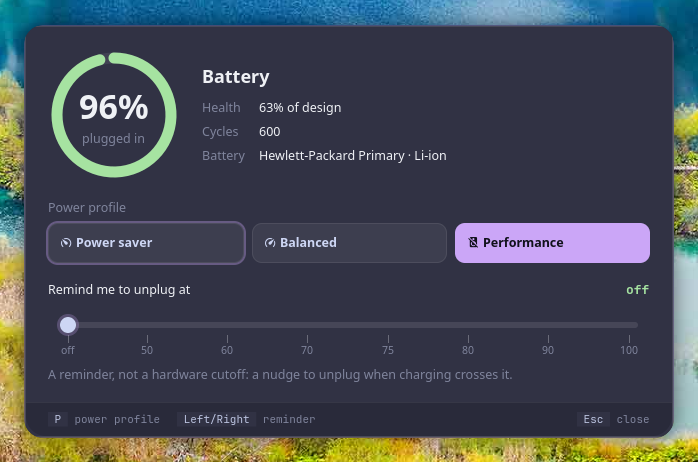
Urja (ऊर्जा) is Sanskrit for "energy": the energy your laptop runs on.
urja is the battery at a glance for Vyom: one keyboard-driven panel that opens instantly, with live data, a preview and a key for everything. It runs on any compositor with the layer-shell protocol (sway, Hyprland, river, niri, Wayfire, labwc…). In Vayu, the desktop it was built for, it replaces battery-limit-picker.py.
#Features
- A charge ring, time to full or empty, power draw in watts, the battery's health (of its design capacity) and cycle count.
- Works with both kinds of battery driver (energy_* / power_now, or charge_* / current_now).
- The power profile (power-profiles-daemon), switched with a click or
P. - With
limit_fileset, a charge-limit reminder slider: the percentage a watcher of yours nudges you to unplug at. - Keyboard first: every action has a key, shown in the footer; the mouse works too.
- Never freezes the panel: slow commands run in the background.
#Install
#Requirements
- Vyom 0.2.6 or newer (Python 3.11+, PyGObject, GTK 4, gtk4-layer-shell, a Nerd Font)
- optional: powerprofilesctl (power profile)
#Install
git clone https://github.com/Theyashsawarkar/urja ~/.local/share/vyom/plugins/urja
vyom reload           # pick it up (or log out and in)
vyom urja            # open it; run it again to close
Give it a key in your compositor, e.g. sway:
bindsym $mod+<key> exec vyom urja#Update and uninstall
git -C ~/.local/share/vyom/plugins/urja pull && vyom reload     # update
rm -rf ~/.local/share/vyom/plugins/urja && vyom reload # uninstall#Usage
Open it with vyom urja (or your key). Type to search; the footer always shows the keys for what's selected.
| Key | Action |
|---|---|
Left / Right | Change the charge-limit reminder (on the slider) |
P | Switch the power profile |
Esc | Close the panel |
Every Vyom panel also has Up/Down (or Ctrl+K/Ctrl+J) to move, Page Up/Page Down to jump and Tab to switch to the next tool.
#Configuration
Everything is optional, in ~/.config/vyom/config.toml under [plugin.urja]:
| Setting | Default | What it does |
|---|---|---|
limit_file | (unset: no slider) | File holding the reminder percentage (Vayu: ~/.local/state/battery-limit/threshold) |
Run vyom reload after editing.
#Troubleshooting
- Nothing opens.
vyom listshows every installed tool, and why one is skipped (a missing requirement, or a Vyom that's too old). - It opened, then something failed. Look for a
Tracebackin~/.local/state/vyom/daemon.log, and open an issue with it. - No blur or rounded corners. That's the compositor: on SwayFX, add
layer_effects "vyom" { blur enable; corner_radius 20; shadows enable }.
#The Vyom family
Each tool is its own repository, so you install only the ones you want:
| Tool | What it does | |
|---|---|---|
| dvara | द्वार, gateway | The app launcher |
| ganit | गणित, mathematics | The calculator and converter |
| smriti | स्मृति, memory | Clipboard history |
| bhava | भाव, feeling, emotion | The emoji picker |
| tarang | तरंग, wave | Wi‑Fi and the hotspot |
| setu | सेतु, bridge | Bluetooth |
| doot | दूत, messenger | Your phone, through KDE Connect |
| patra | पात्र, vessel | Docker containers |
| suchana | सूचना, notice | Notifications |
| raga | राग, melody | YouTube music and video |
| mudra | मुद्रा, gesture | Keybinding search |
| urja (this one) | ऊर्जा, energy | The battery at a glance |
| vishram | विश्राम, rest | The power menu |
| kendra | केन्द्र, centre | Quick settings |
#Contributing
Bug reports, ideas and pull requests are welcome: see CONTRIBUTING.md for the development setup and the few rules every tool follows, and CHANGELOG.md for what changed in each release. Please report security issues privately (SECURITY.md).
#License
MIT.