
Nāda (नाद) is Sanskrit for "sound": in Indian music theory, the primordial sound every note comes from.
nāda is a music player for people who live on the keyboard. Songs on your disk and music from YouTube share one queue. Play a song and, like YouTube, nāda lines up what comes next; reorder or remove anything with vim keys. Lyrics scroll along with the song. If you like a YouTube song, D saves it to your music folder, with its tags, cover and lyrics, while it keeps playing. It runs on MPD, so your library, queue and playback carry on with the window closed.
#Features
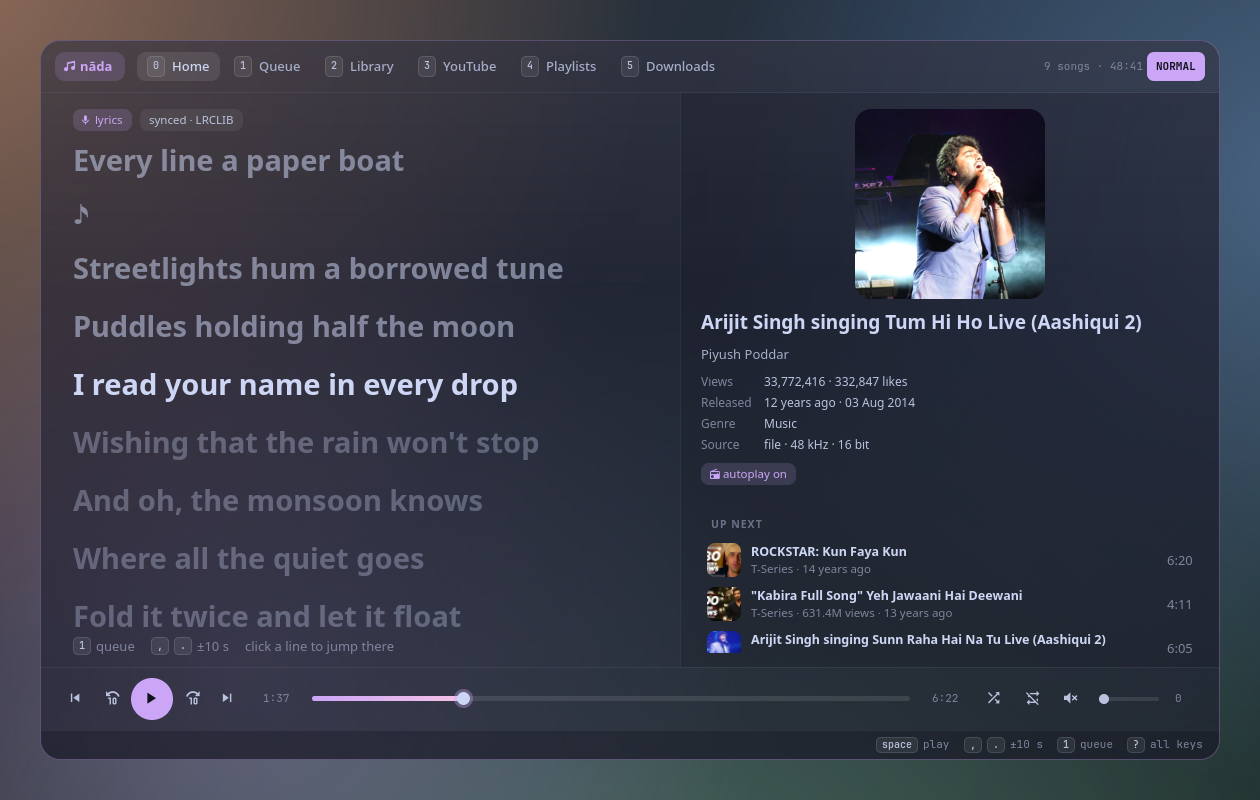
- Home is the lyrics. The window opens on the playing song's lyrics, large, the current line lit and centred, scrolling with the song. Click a line to jump there. On the right: the cover, the title, the singers, the film or album, views and how long ago it came out, and the next three songs.
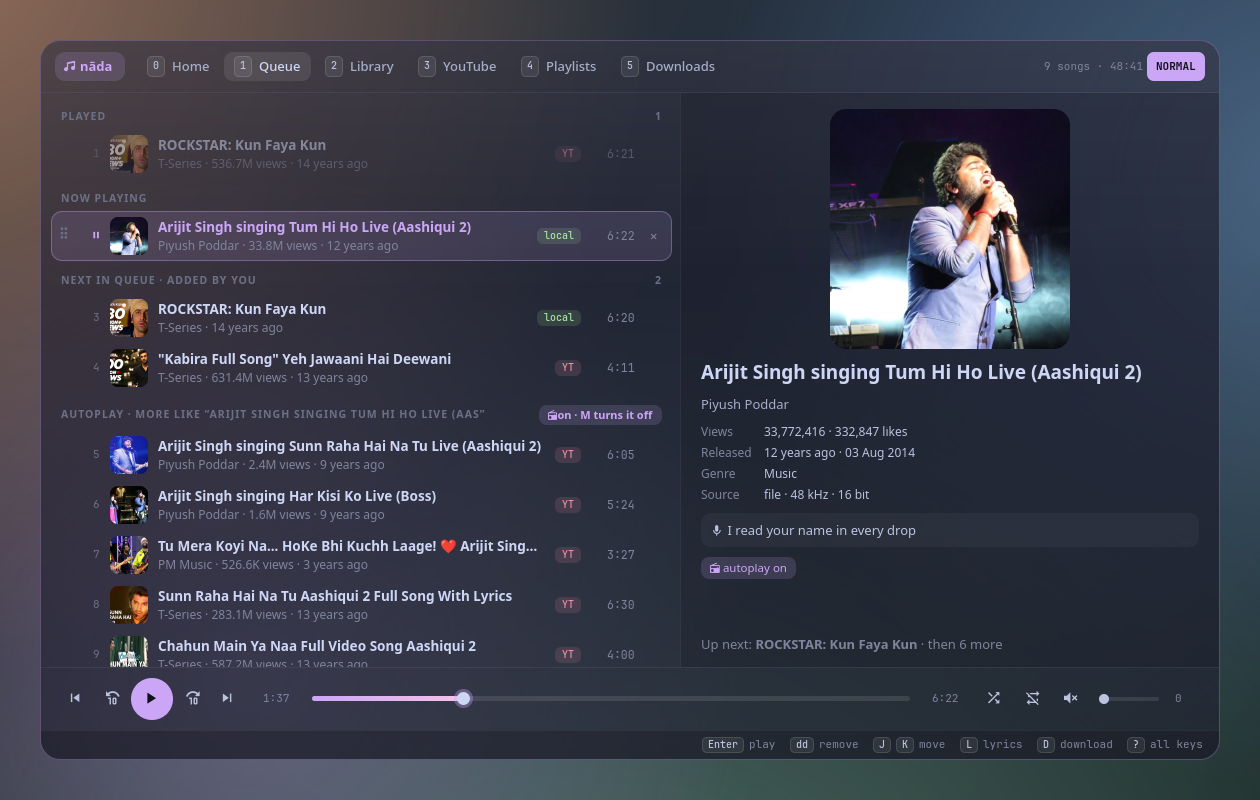
- Up next, like YouTube. Playing a YouTube song lines up YouTube's own mix for it; a song from your library brings the rest of its album and more by that artist. The queue shows what you added and what autoplay added separately, refills itself as it runs low, and
Mturns it off. - Your queue, edited like text.
ddremoves,J/Kmove a song,yy/pcopy and paste,Vselects several,uundoes,Ctrl+rredoes, and you can drag rows by their handle or click × to remove one. - Seek anywhere.
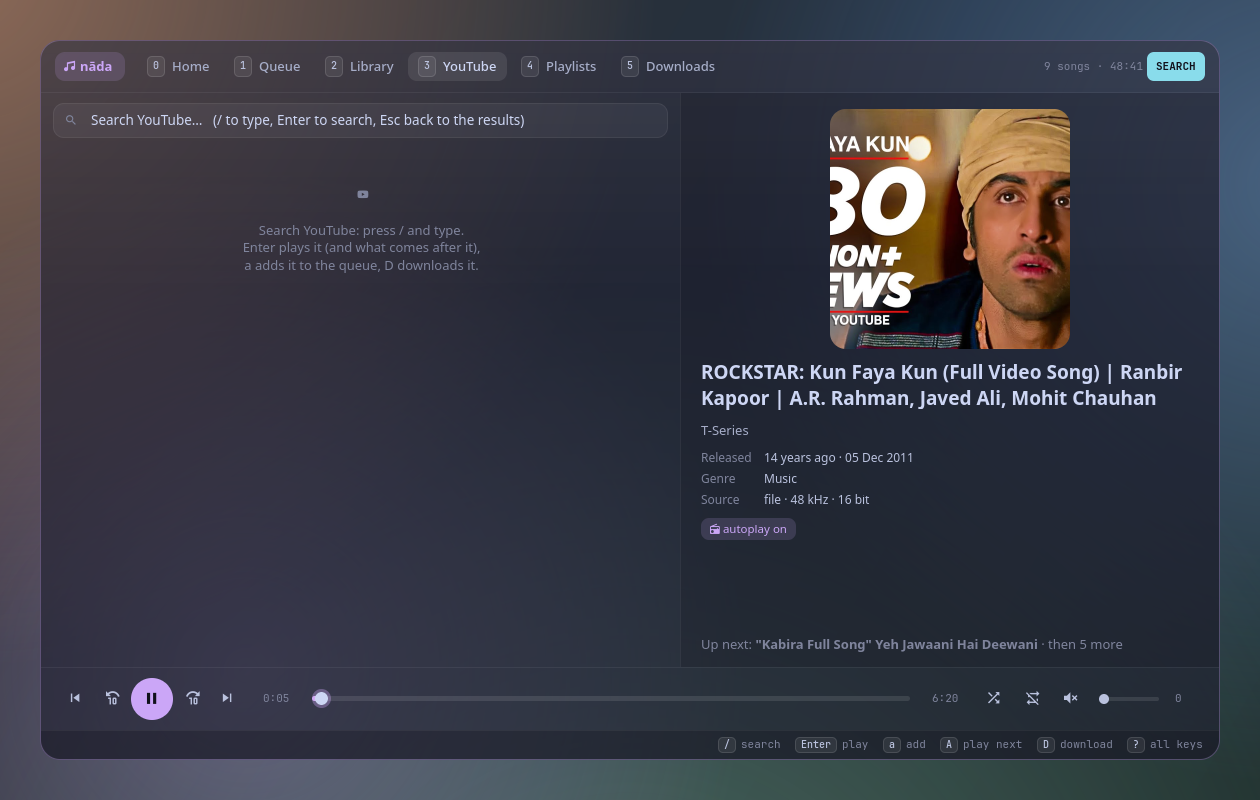
,and.skip 10 seconds (3.skips 30), the ⟲ ⟳ buttons do the same, and the progress bar is clickable. - YouTube without an account. Search in the YouTube tab (
3) or from raga; every result shows its views and age. Stream links expire after a few hours, so nāda remembers the video, not the link, and renews it before it plays. - Download what you like.
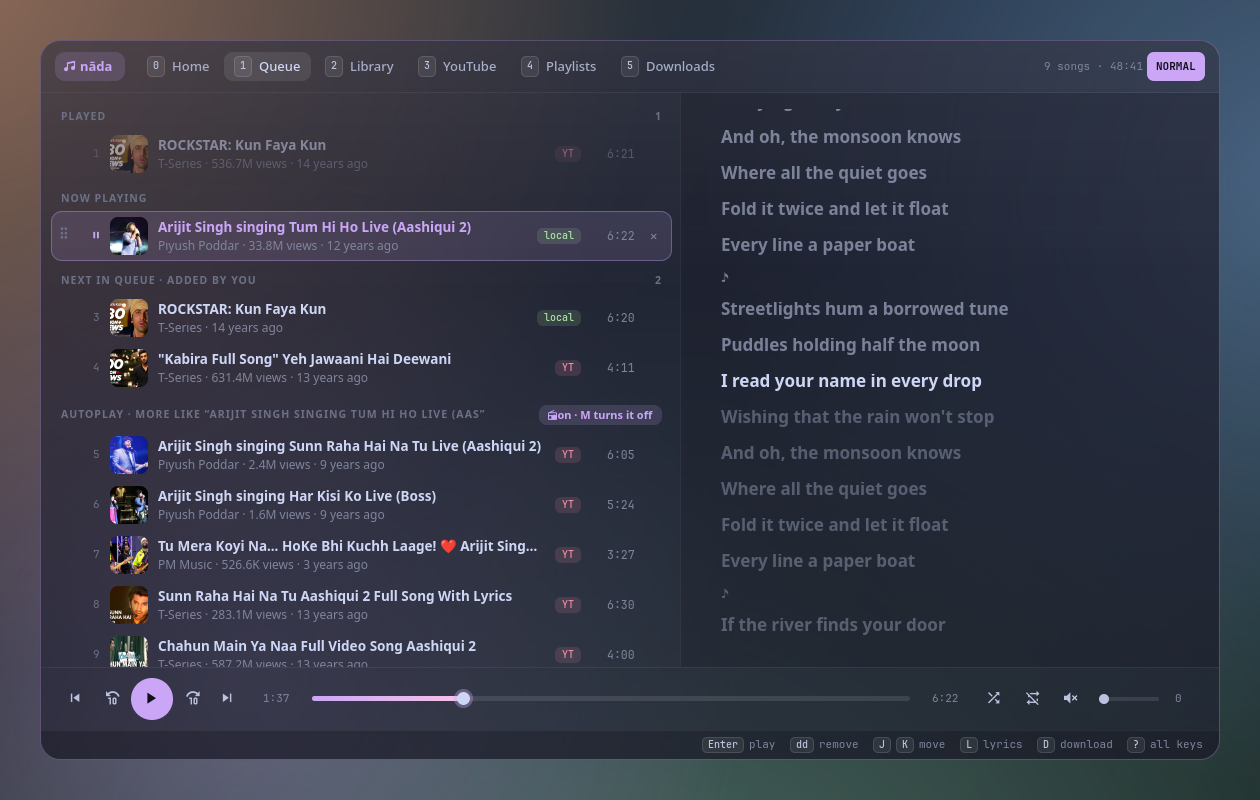
Dsaves a YouTube song as Opus (what YouTube streams, so nothing is re-encoded) into~/Music/YouTube/<Artist>/<Title>.opus, with tags, cover art and a.lrclyrics file. When it finishes, the queue entry is swapped for the file in place, and playback carries on from the same second. - Lyrics found for you: a
.lrcnext to the song, lyrics in its tags, or LRCLIB (free and open). YouTube titles like "ROCKSTAR: Kun Faya Kun (Full Video Song)" are cleaned up first, and:lyrics <search>picks them by hand when it guesses wrong. - Your library in columns, like yazi: artists, albums, genres or folders (
Tab),h/lbetween columns,/searches everything. - Playlists that mix files and YouTube songs:
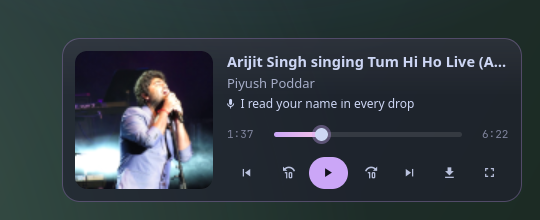
:w namesaves the queue,:e nameloads one. - A mini player (
z) in the corner, with the current lyric line. - Everywhere on the desktop: MPRIS for media keys,
playerctland your phone (KDE Connect); a waybar module;nada ctlfor scripts and key bindings; a notification with the cover when the song changes. - Never freezes: anything slow (YouTube, lyrics, covers) runs in the background.
#Install
#Requirements
- Python 3.11+, PyGObject, GTK 4
- MPD (the engine: it plays, keeps the queue and indexes your music)
- yt-dlp for YouTube, and ffmpeg for downloads
- optional: gtk4-layer-shell (the mini player floats in a corner), mutagen (tags on downloads), a Nerd Font for the icons
# Arch
sudo pacman -S --needed python-gobject gtk4 mpd yt-dlp ffmpeg python-mutagen gtk4-layer-shell ttf-jetbrains-mono-nerd
systemctl --user enable --now mpd
MPD needs a music_directory and an audio output; the Arch wiki has a five-line config. nāda finds MPD the way every MPD client does: MPD_HOST / MPD_PORT, else MPD's socket in $XDG_RUNTIME_DIR/mpd/socket, else localhost:6600.
#nāda
git clone https://github.com/Theyashsawarkar/nada ~/.local/share/nada
ln -s ~/.local/share/nada/bin/nada ~/.local/bin/nada
nada            # opens the player (it starts itself the first time)
Update with git -C ~/.local/share/nada pull && nada quit.
#Usage
nada                       open the player, or close it if it's open
nada show | hide | mini    the full player, hidden, the mini player
nada tab <name>            open on a tab: home queue library youtube playlists downloads
nada add [--next|--play] <YouTube URL | file | search words>
nada ctl toggle|play|pause|stop|next|prev
nada ctl seek +10 | seek -10 | seek 1:30
nada ctl vol +5 | vol -5 | vol 40
nada status [--json]       what's playing
nada waybar                JSON for a waybar module
nada daemon | quit         start / stop the player (MPD keeps playing)
The player is one resident process; nada only sends it a D-Bus message, so it opens at once. ctl, status and waybar talk to MPD directly and work even when the player isn't running. Closing the window (q, Esc) only hides it: the music, autoplay and downloads carry on.
#Keys
The footer always shows the keys for where you are; ? shows them all. Counts work like vim: 5j, 3., 2dd.
| Key | Action |
|---|---|
0 | Switch to Home (the lyrics) |
1 2 3 4 5 | Switch to the queue, library, YouTube, playlists, downloads |
j / k | Move down / up a song (counts work: 5j) |
gg / G | Jump to the top / bottom (12G: to the 12th) |
Ctrl+d / Ctrl+u | Scroll half a page down / up |
Enter | Play the selected song |
Space | Toggle play / pause |
. / , | Seek forward / back 10 seconds (3. = 30 s) |
> / < | Play next / previous song |
= / - | Raise / lower volume |
m | Toggle mute |
s | Toggle shuffle |
r | Cycle repeat (off, all, this song) |
M | Toggle autoplay (more like this after your songs) |
V | Select several songs (visual mode) |
u | Restore the last change (undo) |
Ctrl+r | Restore an undone change (redo) |
/ | Search (the list; YouTube on 3; your library on 2) |
n / N | Jump to the next / previous search match |
: | Run a command (:w name, :sleep 30m, :yt query…) |
? | Show all keys |
z | Switch to the mini player |
q / Esc | Close the window (the music keeps playing) |
Queue (1)
| Key | Action |
|---|---|
dd | Remove the song from the queue (V: the selection) |
yy | Copy the song (yank) |
p / P | Paste removed or copied songs below / above |
J / K | Move the song down / up |
A | Move the song to play next |
D | Save the YouTube song to your music folder (download) |
L | Show the lyrics on the right |
zz | Jump to the song that's playing |
Library (2), YouTube (3), Downloads (5)
| Key | Action |
|---|---|
h / l | Move between the columns |
Tab | Switch between artists, albums, genres and folders |
a / A | Add to the end of the queue / to play next |
D | Save the result to your music folder (download) |
r | Restart a failed download |
dd | Delete the saved file (asks first) |
Mini player (z)
| Key | Action |
|---|---|
Space | Toggle play / pause |
. / , | Seek forward / back 10 seconds |
> / < | Play next / previous song |
z / Enter | Switch back to the full player |
q / Esc | Close the mini player (the music keeps playing) |
#Commands
Typed after :, like vim.
| Command | Does |
|---|---|
:w <name> | Save the queue as a playlist (YouTube songs included) |
:e <name> | Replace the queue with a playlist (:e alone opens Playlists) |
:yt <search> | Play the top YouTube result, and its mix after it |
:play <search> | Play a song from your library (falls back to YouTube) |
:add <url or search> | Add to the end of the queue |
:seek 1:30 · :seek +30 | Jump to a time, or by an amount |
:vol 40 · :vol +10 | Set or change the volume |
:sleep 30m · :sleep off | Fade out and pause after a while |
:lyrics <search> | Pick the lyrics by hand (remembered for the song) |
:autoplay on · off | Same as M |
:dl | Download the playing song |
:clear | Empty the queue (u brings it back) |
:q · :qa | Hide the window · quit the player |
#Configuration
Everything is optional, in ~/.config/nada/config.toml:
[nada]
autoplay = true          # line up more songs after yours (M toggles it, and it's remembered)
download_dir = "YouTube" # inside MPD's music directory
format = "opus"          # opus (no re-encoding) | mp3 | m4a
seek_step = 10           # seconds for , and .
volume_step = 5
notify = true            # a notification when the song changes (while the window is hidden)
opacity = 0.62           # window background: 1 is solid, lower shows the blur behind it
music_dir = ""           # default: MPD's music_directory
~/.config/nada/style.css is loaded last, to restyle anything (the default look is Catppuccin Mocha with a mauve accent: see nada/style.css).
#Desktop integration
sway (the same works with any compositor's key bindings):
exec nada daemon
bindsym $mod+Shift+m exec nada                       # open / hide
bindsym $mod+Mod1+space exec nada ctl toggle          # without opening anything
bindsym $mod+Mod1+period exec nada ctl next
bindsym $mod+Mod1+comma exec nada ctl prev
for_window [app_id="^dev\.vayu\.Nada$"] floating enable, resize set 1180 720, move position center
Media keys going through playerctl work as they are: nāda speaks MPRIS. On SwayFX, blur enable, corner_radius 20 in that for_window rule gives the window its glass look; the mini player is a layer-shell surface named nada (layer_effects "nada" { blur enable; corner_radius 18; }).
waybar, a module that shows what's playing (and disappears when nothing is):
"custom/nada": {
  "exec": "nada waybar",
  "return-type": "json",
  "on-click": "nada ctl toggle",
  "on-click-middle": "nada ctl next",
  "on-click-right": "nada",
  "on-scroll-up": "nada ctl seek +10",
  "on-scroll-down": "nada ctl seek -10"
}
Its class is play, pause or stopped, to style each state.
From other tools: nada add --play <url> plays a YouTube link with its mix after it; raga, the YouTube search panel, uses exactly that.
#How it works
 raga, keys, waybar ──► nada (bin/nada: D-Bus) ──► the player process ──► MPD ──► speakers
                                                    │
                                                    ├─ yt-dlp: search, mixes, stream links, downloads
                                                    ├─ LRCLIB: lyrics
└─ MPRIS: media keys, phone, playerctlnada/core.pyis the model: MPD's queue and state, plus what MPD doesn't do (YouTube songs and their expiring links, autoplay, undo, downloads, lyrics, covers). Slow work runs on worker threads and reports back on the GTK main loop.nada/window.pyis the window and the vim key engine (modes, counts, pending operators, registers);nada/views.pythe six tabs and the right pane;nada/mini.pythe mini player;nada/mpris.pyMPRIS.- YouTube songs sit in MPD's queue as stream URLs, tagged with their video id, so other MPD clients see and play them too.
#Troubleshooting
- "MPD isn't running".
systemctl --user start mpd(andenableit). nāda reconnects by itself. - No sound but it says it's playing. That's MPD's audio output: check
audio_outputin yourmpd.conf(PipeWire users:type "pipewire"or"pulse"). - "Volume control unavailable". Your MPD output has no mixer; set
mixer_type "software"in itsaudio_outputblock. - A YouTube song won't play. Update yt-dlp first (
yt-dlp -U, or your package manager): YouTube changes often and yt-dlp follows. - Wrong or missing lyrics.
:lyrics <artist> <song>picks them by hand. - Anything else.
~/.local/state/nada/daemon.loghas the details; please open an issue with it.
#Contributing
Bug reports, ideas and pull requests are welcome: see CONTRIBUTING.md for the development setup and the rules the code follows, and CHANGELOG.md for what changed in each release. Please report security issues privately (SECURITY.md).
nāda is part of Vayu, a keyboard-driven Wayland desktop, and works on its own on any desktop with MPD.