
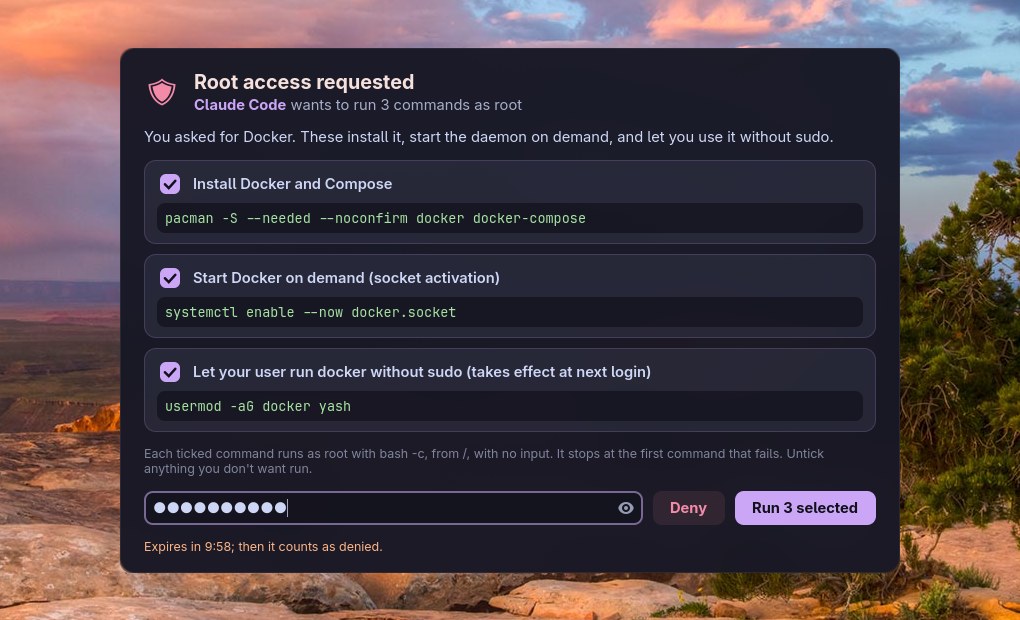
Anumati (अनुमति) is Sanskrit for "permission, consent": nothing runs as root without yours.
An AI coding agent (Claude Code, Codex, Aider, Gemini CLI, anything that can run a shell command or speak MCP) regularly needs something done as root: install a package, enable a service, edit a file in /etc. The usual answer is to copy sudo commands between the agent and a terminal. anumati replaces that: the agent sends the commands, each with a reason; a window shows them on your desktop; you untick what you don't want, type your password once, and the ticked commands run. The agent gets every command's output and exit code back.
#Features
- You see exactly what runs: every command as it will run, under the agent's one-line reason for it, and a checkbox on each.
- One password for the batch, typed into a window the agent didn't start and can't read. No sudo timestamp is left behind (
sudo -k). - Structured results: per-command state (
ok,failed,skipped,declined), exit code, stdout and stderr, as JSON on stdout, with meaningful exit codes. - Two ways in: JSON on stdin (or
--cmd/--whypairs) for anything that runs shell commands, and an MCP server (--mcp) with one tool,request_root_commands. - Refuses tricks: requests with control characters or invisible Unicode (bidi overrides, zero-width) are rejected, so what you read is what runs; every command needs a reason; at most 50 per request.
- Audit trail: a root-only log of everything that ran, and your own log of every request, denied ones included.
- Expires: an unanswered request counts as denied after 10 minutes.
#Install
Requirements: Linux with a Wayland desktop (sway, Hyprland, GNOME, KDE…) and systemd's user manager, sudo, Python 3.11+, PyGObject, GTK 4, libadwaita, and libnotify (notify-send).
git clone https://github.com/Theyashsawarkar/anumati ~/.local/share/anumati
~/.local/share/anumati/install.sh          # asks for sudo once
anumati --why "Test" --cmd "id"            # the window opens; approve it
install.sh installs everything root-owned (/usr/local/bin/anumati, /usr/local/lib/anumati/), so an agent running as your user can't change what the window shows or what it runs. On Arch it installs the dependencies too; elsewhere install them first (Debian/Ubuntu: python3-gi gir1.2-gtk-4.0 gir1.2-adw-1 libnotify-bin; Fedora: python3-gobject gtk4 libadwaita libnotify).
~/.local/share/anumati/install.sh --check       # what differs from this clone
git -C ~/.local/share/anumati pull && ~/.local/share/anumati/install.sh   # update
~/.local/share/anumati/install.sh --uninstall
It used to be called vayu-elevate; the installer keeps that name as a link to anumati, so agents and notes that still use it keep working.
#What you see
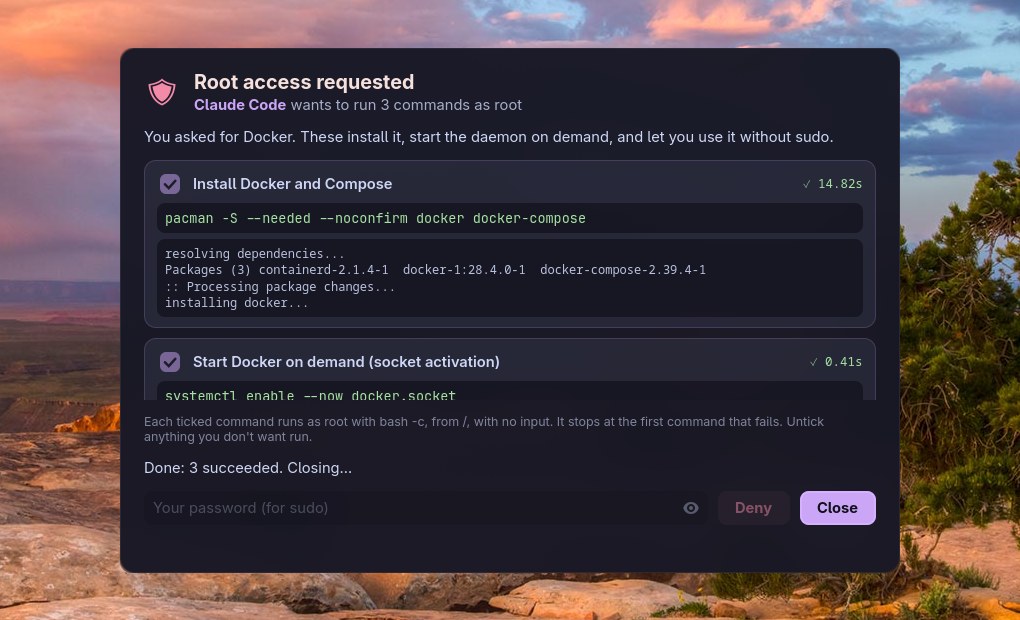
A window opens with everything the agent asked for: each command exactly as it will run, its reason, and a checkbox. Untick anything you don't want, type your password, press Run (or Enter). The ticked commands run in order, stopping at the first failure, and each card shows its result. If they all succeed the window closes by itself; if one fails it stays open with the error.
| Key | Action |
|---|---|
Enter (password field) | Run the selected commands as root |
Space | Toggle the focused command |
Esc | Cancel the root request (deny everything; closes the window after a run) |
Enter (after a failed run) | Close the window |
Closing the window, Deny or Esc means nothing runs. Three wrong passwords end the request. A request nobody answers expires after 10 minutes.
#For agents: sending a request
Send a JSON request on stdin. It blocks until the user answers (up to 10 minutes), then prints a JSON result.
anumati <<'EOF'
{
  "requester": "Claude Code",
  "reason": "Install Docker and start it on demand, as you asked.",
  "commands": [
    {"cmd": "pacman -S --needed --noconfirm docker", "why": "Install Docker"},
    {"cmd": "systemctl enable --now docker.socket", "why": "Start Docker when something connects to it"}
  ]
}
EOF
One-off form: anumati --requester "Claude Code" --why "Reload udev rules" --cmd "udevadm control --reload" (repeat --why/--cmd pairs for more). anumati --schema prints the request and result JSON Schema.
Rules for the commands:
- Each runs as root with
bash -c, from/, with no stdin and no tty: anything that prompts fails or hangs until its 30-minute limit. Usepacman --noconfirm,apt -y,cp -fand the like. - They run in order and stop at the first non-zero exit; the rest are reported as
skipped. - Every command needs a
why: one plain line the user decides from. - At most 50 commands, 8000 characters each; no control characters or invisible Unicode.
~is root's home here: write/home/<user>/...in full.
Ask for exactly what's needed, explain each command honestly, don't re-send a denied request unless the user asks, and treat a declined command as the user's answer.
#For agents: reading the result
{
  "status": "completed",
  "message": "Ran the approved commands.",
  "approved": [0, 1],
  "declined": [],
  "results": [
    {"index": 0, "command": "pacman -S --needed --noconfirm docker", "why": "Install Docker",
     "decision": "approved", "state": "ok", "exit_code": 0, "stdout": "...", "stderr": "",
     "duration": 14.2, "timed_out": false, "truncated": false}
  ]
}
status | Meaning |
|---|---|
completed | At least one command was approved and they ran: check each result's state |
denied | The user pressed Deny, Esc or closed the window; nothing ran |
timeout | No answer within 10 minutes; nothing ran |
auth_failed | Wrong password three times; nothing ran |
error | Bad request or the tool itself failed; see message |
state | Meaning |
|---|---|
ok | Ran, exit code 0 |
failed | Ran, non-zero exit code |
skipped | Approved, but an earlier command failed |
declined | The user unticked it |
not_run | The request was denied, timed out or failed before running |
Output is capped at 512 KB per stream (truncated: true when cut).
| Exit code | Meaning |
|---|---|
0 | Every command was approved and succeeded |
1 | An approved command failed |
2 | Bad request or tool error |
3 | Nothing ran (denied, timeout, wrong password) |
4 | Some commands were declined; the approved ones succeeded |
#For agents: over MCP
anumati --mcp is an MCP server (stdio) with one tool, request_root_commands, taking the same request object and returning the result as text and structuredContent.
claude mcp add --scope user anumati -- anumati --mcp # Claude Code{
"mcpServers": {
"anumati": {"command": "/usr/local/bin/anumati", "args": ["--mcp"]}
}
}The call blocks until the user answers, up to 10 minutes. If your client times out tool calls sooner, raise its limit (Claude Code: the MCP_TOOL_TIMEOUT environment variable, in milliseconds).
#Telling your agent about it
Add a few lines to the agent's global instructions (Claude Code: ~/.claude/CLAUDE.md; Codex: ~/.codex/AGENTS.md; Gemini CLI: ~/.gemini/GEMINI.md):
- Commands that need root: don't ask me to paste sudo commands. Send them to
  `anumati` (JSON on stdin: requester, reason, commands: [{cmd, why}];
  see `anumati --help`). I approve them in a window; you get the results.
Respect declined commands; never retry a denied request unasked.#What's recorded
Every command that ran as root, with its exit code, goes to /var/log/anumati.log: root-only, so the agent can't edit it. Every request, denied ones included, goes to your own ~/.local/state/anumati/requests.jsonl.
sudo tail -n 20 /var/log/anumati.log | jq .
tail -n 5 ~/.local/state/anumati/requests.jsonl | jq .#Security
anumati is a consent gate: nothing runs as root unless you see it and type your password.
| Guarantee | How |
|---|---|
| The agent never sees your password | It's typed into the approval window: a separate process the agent didn't start (a transient systemd user service, with a clean environment) and can't inspect (PR_SET_DUMPABLE=0). |
| What runs is what you saw | The window and the root-side runner are root-owned files; the window holds the request in memory once shown; Python runs isolated (-I); your GTK styling can't hide part of it (the window uses root-owned XDG dirs); invisible or direction-changing characters are refused. |
| No leftover access | sudo runs with -k both times: no cached credentials for anything else. |
What it can't do: protect you from a program that is actively malicious and already running as your user. Such a program could draw a lookalike window to collect your password, or tamper with the systemd user manager the window starts from; that's true of every password prompt on a Linux desktop, polkit's included. Use anumati with agents you trust to ask honestly, and read each command before you approve it. Report security problems privately: SECURITY.md.
#How it works
anumatirejects bad requests (nowhy, more than 50 commands, hidden characters), writes the request to$XDG_RUNTIME_DIR/anumati/<id>/(mode 0700) and starts the window withsystemd-run --userandenv -i: a transient service, not a child of the agent.- The window (
lib/dialog.py, GTK 4 / libadwaita) reads the request once into memory and shows it. You untick, type your password, press Run. - It checks the password with
sudo -S -k true, then startssudo -S -k -- python3 -I runner.py, writing the password and the approved commands to its stdin. Nothing is written to disk. - The runner (
lib/runner.py) runs each command withbash -cfrom/, no stdin, a minimal environment, 30 minutes max each, stopping at the first failure, and appends each to/var/log/anumati.log. - The window writes
result.json;anumatiprints it and exits.
#Troubleshooting
- No window appears. anumati needs a graphical session:
WAYLAND_DISPLAY(orDISPLAY) and systemd's user manager. From SSH or a plain TTY it returnsstatus: error. - "Wrong password" though it's right. Your user must be allowed to use
sudo(thewheelgroup on Arch,sudoon Debian). - A command hangs, then times out. It's waiting for input: add a non-interactive flag (
--noconfirm,-y). - The window looks unstyled or tiny. Install libadwaita; on a tiling compositor, float it: sway
for_window [app_id="^io\.github\.theyashsawarkar\.Anumati$"] floating enable.
#Contributing
Bug reports, ideas and pull requests are welcome: see CONTRIBUTING.md, and CHANGELOG.md for what changed in each release. Changes to what runs as root get extra scrutiny; security reports go privately (SECURITY.md).
anumati comes from Vayu, a keyboard-driven Wayland desktop, and works on any Linux desktop on its own.