Tools
Tools the Vayu desktop provides beyond its configs. The first set is for AI agents. Click a tool in the table to jump to its section.
AI tools
Vayu gives AI agents (Claude Code, Codex, Aider, or anything that can run a shell command or speak MCP) desktop tools of their own, so working with an agent doesn’t mean copying commands back and forth. Every tool keeps you in charge: an agent can ask, only you can approve.
| Tool | What it does | How agents use it |
|---|---|---|
| anumati | Runs root commands an agent asks for, after you see each one and why, tick which to allow, and type your password once. | anumati (JSON on stdin), or the MCP tool request_root_commands |
Each is its own repository (Vayu’s plugin rule), cloned by install.sh and
installed root-owned, so an agent can’t change what it shows you or what it
runs. vayu-verify checks them.
anumati
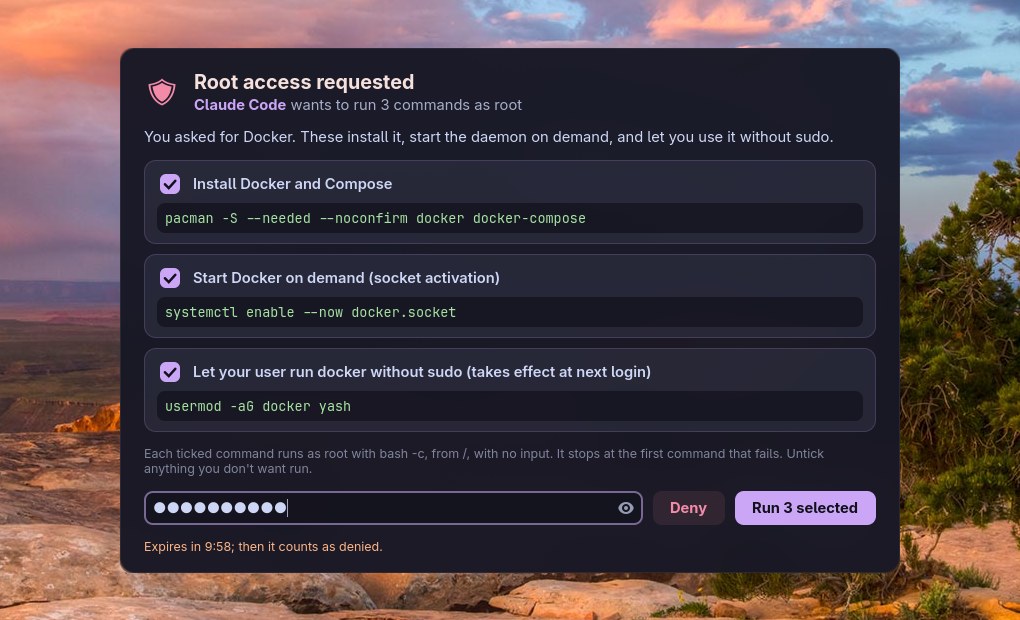
Root commands, approved once. When an agent needs something done as
root (install a package, enable a service, edit a file under /etc), it
sends the commands to anumati
(अनुमति, “permission”) instead of asking you to paste them into a terminal.
A window shows every command and why; you untick what you don’t want and
type your password once; the agent gets the results as JSON. It was called
vayu-elevate until 2026-10-21, and that name still works (a link).
| At a glance | |
|---|---|
| Command | anumati (JSON on stdin, or --cmd/--why pairs) |
| MCP | anumati --mcp, tool request_root_commands |
| Runs as | root, bash -c, from /, no stdin, 30 min per command |
| Expires | after 10 minutes without an answer (counts as denied) |
| Logs | /var/log/anumati.log (root-only), ~/.local/state/anumati/requests.jsonl |
| In Vayu | cloned to ~/.local/share/anumati, installed root-owned by its install.sh (install.sh step “Installing anumati”) |
| Docs | the README: the request and result formats, MCP setup, the security model |
Claude Code on this desktop is told to use it in the global
~/.claude/CLAUDE.md (the stowed claude/ package). Problems: the “AI
tools” entries in Troubleshooting.